Text 02 Video Effect
from concept to #1
( ROLE )
Product Designer
( TEAM )
VOCHI
( TIMELINE )
2022
( TOOLS )
After Effects
An effect that fights the subject for attention doesn't support that content – it works against it. And dialing existing effects back doesn't solve it: a subtle version of an attention-grabbing effect still competes with the subject, just more quietly. Content-first required a different spatial logic entirely.
Text 02 was my concept from a two-week sprint: user-entered text placed behind the masked subject. The subject stays in front. The text fills the negative space. Expressive, but the content always wins. It shipped in roughly four weeks and became the #1 iOS effect by saves – surpassing Butterflies, which had held that spot for 1.5 years.
VOCHI built its reputation on effects that demanded attention – bold, high-contrast, visually assertive. That was exactly the problem. After Pinterest acquired VOCHI, the content brief shifted – fashion, beauty, food, home.
Problem
We needed something expressive but restrained: an effect that adds meaning and style without overpowering the content. That ruled out most directions – any approach that added visual complexity was in direct tension with the brief.
The constraints made it harder: the effect had to work across verticals without tuning, keep the subject central and readable, tolerate imperfect segmentation masks, and offer adjustable settings that didn't confuse users.
Solution
Text 02 puts user-entered text behind the masked subject. The effect is content-first by construction, not by restraint.
That spatial logic solves several constraints at once. Because the user types the text, the effect works across any vertical without product-side effort: any words, any theme. Because the text sits behind the subject, the subject always wins visually – the hierarchy is built in.
The mask tolerance comes from a specific design choice: most text lines use only a stroke, no fill. One line at a time cycles through with fill, animated in sequence. That's what keeps the text visible while staying light on the frame and it's what makes the effect forgiving of rough segmentation. A solid fill behind the subject would expose every imperfect edge. Outlines don't.

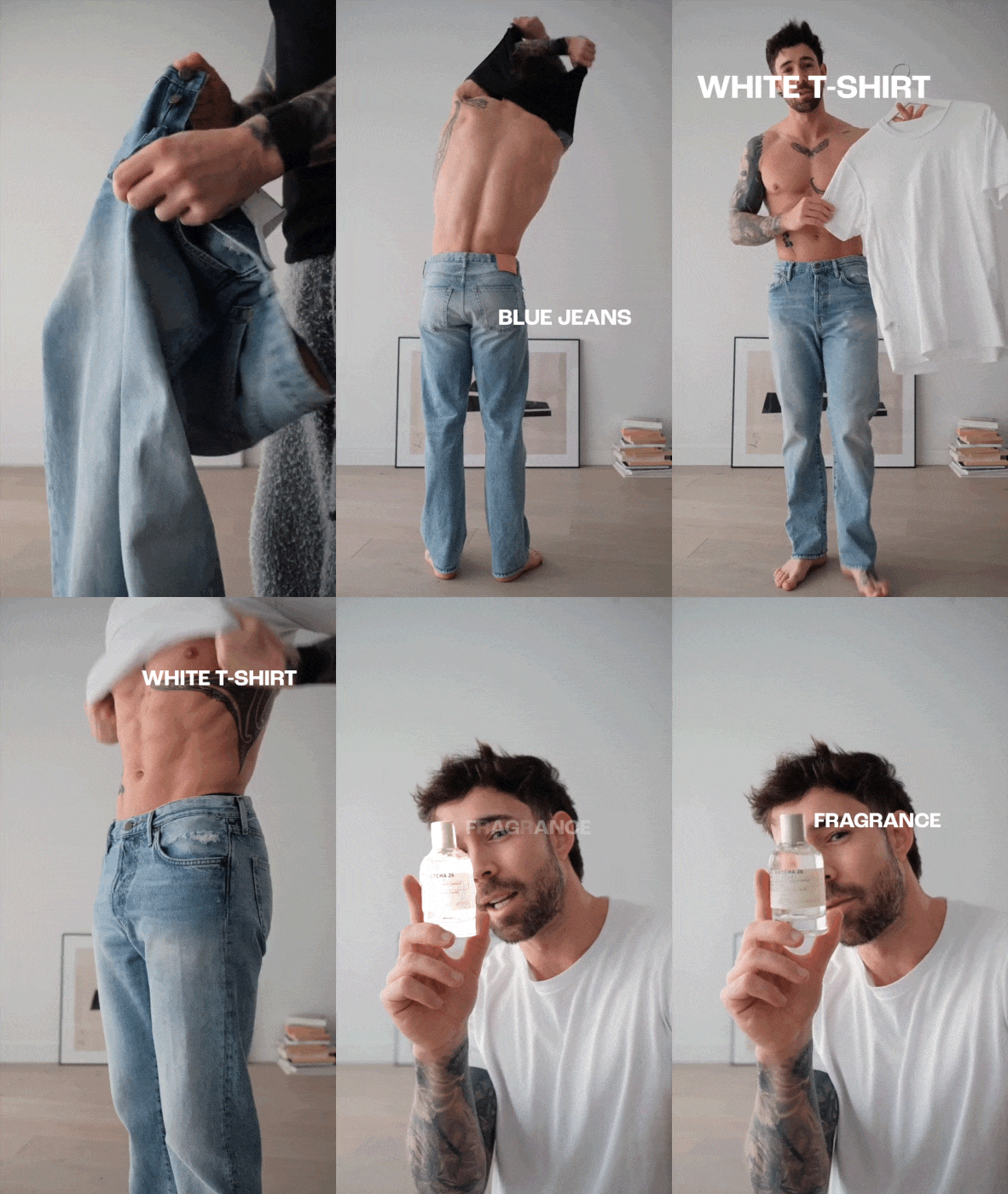
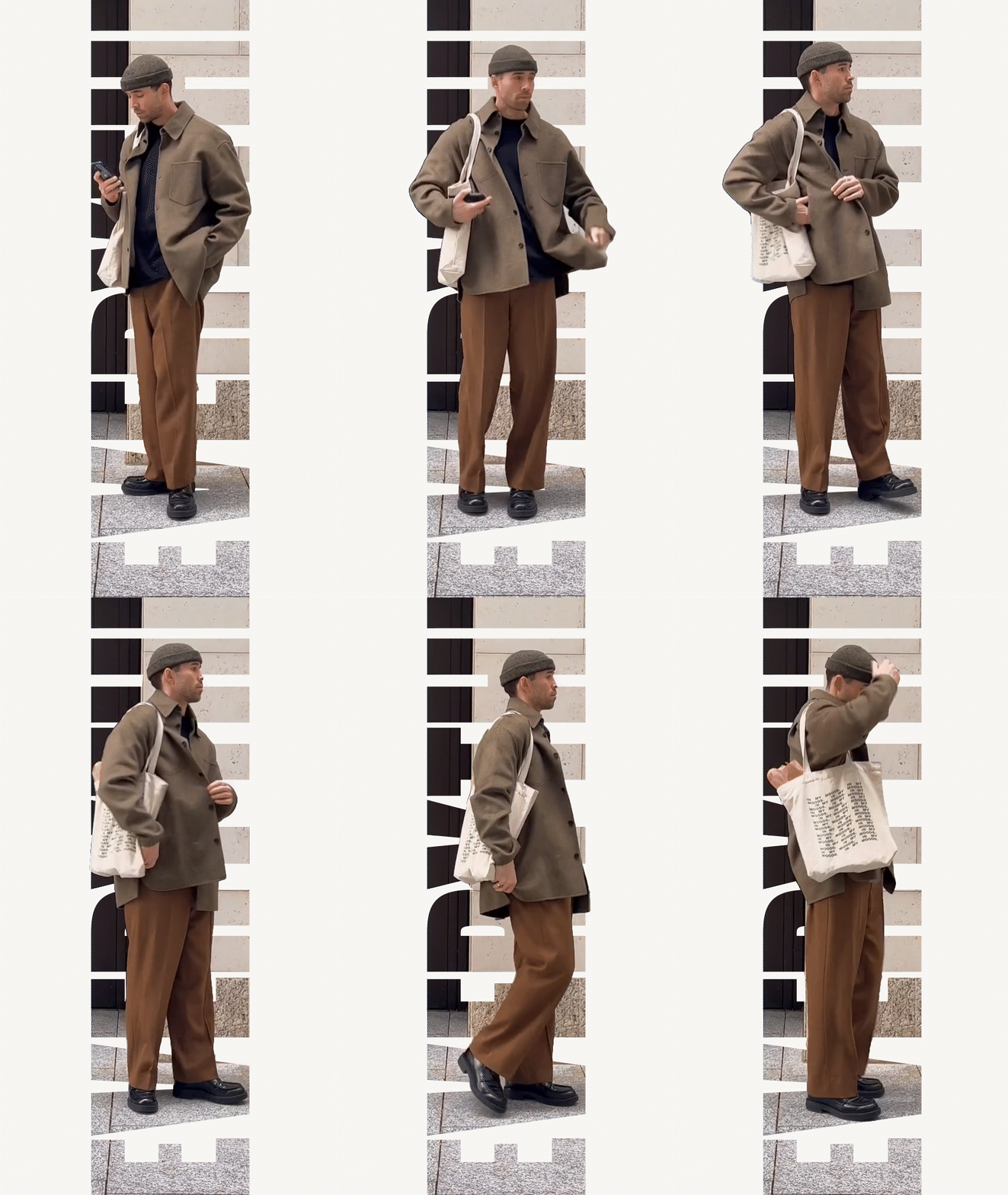
[some of my early concepts]
My role
Product Designer – concept → behavior → spec → QA.
I proposed and refined the concept during the sprint alongside other directions. After leadership selected the concept, I wrote the engineer-facing spec, translating the concept into buildable behavior. That meant defining the animation logic precisely (lines cycle every 10 frames; stroke width 2px by default), specifying how the text field adapts to input length so the number of lines scales with the phrase, setting boundaries (max 0.95 of footage width and height), and defining the user-facing controls: color, position, scale, animation on/off, and animation direction (top-to-bottom, bottom-to-top, or random). The goal was to give the engineer enough to build it correctly without ambiguity, and to give users enough control to make it feel personal without making it complicated.
I tested the effect across different content types and validated that settings – names, ranges, defaults – made sense to someone encountering them for the first time. The goal wasn't just that the effect worked technically, but that it held up visually across the full range of content it would actually be used on.
[in-app experience]
[exported from VOCHI – no post-edit]
[organic social video (TikTok / Instagram) featuring the Text 02 effect]
Impact
Text 02 reached #1 by iOS effect saves (effect_saved, ~5.68% share), surpassing Butterflies –the effect that had led for roughly 1.5 years. Repeat usage was strong early: the weekly rate rose from 23.8% at launch to a 36.1% peak in one of the first tracked weeks.
Repeat usage is the signal that matters most in a creative tool. It means the effect has become part of how people actually make content – not something they try once, find interesting, and move on from. That rate, early in the rollout, suggested Text 02 had found a real place in how users were making videos.
The concept-to-ship timeline was around four weeks total: two weeks of exploration where the concept was selected, then roughly two more weeks of implementation and QA with the engineer.
Text 02 is one of those rare ideas that stay simple from pitch to production – not because it required no judgment, but because the core concept was structurally sound enough that every downstream decision followed from it.
other projects
Celebration System
→
Motion Foundations
→
Text 02 Video Effect
from concept to #1
( ROLE )
Product Designer
( TEAM )
VOCHI
( TIMELINE )
2022
( TOOLS )
After Effects
An effect that fights the subject for attention doesn't support that content – it works against it. And dialing existing effects back doesn't solve it: a subtle version of an attention-grabbing effect still competes with the subject, just more quietly. Content-first required a different spatial logic entirely.
Text 02 was my concept from a two-week sprint: user-entered text placed behind the masked subject. The subject stays in front. The text fills the negative space. Expressive, but the content always wins. It shipped in roughly four weeks and became the #1 iOS effect by saves – surpassing Butterflies, which had held that spot for 1.5 years.
VOCHI built its reputation on effects that demanded attention – bold, high-contrast, visually assertive. That was exactly the problem. After Pinterest acquired VOCHI, the content brief shifted – fashion, beauty, food, home.
Problem
We needed something expressive but restrained: an effect that adds meaning and style without overpowering the content. That ruled out most directions – any approach that added visual complexity was in direct tension with the brief.
The constraints made it harder: the effect had to work across verticals without tuning, keep the subject central and readable, tolerate imperfect segmentation masks, and offer adjustable settings that didn't confuse users.
Solution
Text 02 puts user-entered text behind the masked subject. The effect is content-first by construction, not by restraint.
That spatial logic solves several constraints at once. Because the user types the text, the effect works across any vertical without product-side effort: any words, any theme. Because the text sits behind the subject, the subject always wins visually – the hierarchy is built in.
The mask tolerance comes from a specific design choice: most text lines use only a stroke, no fill. One line at a time cycles through with fill, animated in sequence. That's what keeps the text visible while staying light on the frame and it's what makes the effect forgiving of rough segmentation. A solid fill behind the subject would expose every imperfect edge. Outlines don't.
[some of my other early concepts]
[in-app experience]
My role
Product Designer – concept → behavior → spec → QA.
I proposed and refined the concept during the sprint alongside other directions. After leadership selected the concept, I wrote the engineer-facing spec, translating the concept into buildable behavior. That meant defining the animation logic precisely (lines cycle every 10 frames; stroke width 2px by default), specifying how the text field adapts to input length so the number of lines scales with the phrase, setting boundaries (max 0.95 of footage width and height), and defining the user-facing controls: color, position, scale, animation on/off, and animation direction (top-to-bottom, bottom-to-top, or random). The goal was to give the engineer enough to build it correctly without ambiguity, and to give users enough control to make it feel personal without making it complicated.
I tested the effect across different content types and validated that settings – names, ranges, defaults – made sense to someone encountering them for the first time. The goal wasn't just that the effect worked technically, but that it held up visually across the full range of content it would actually be used on.
Impact
Text 02 reached #1 by iOS effect saves (effect_saved, ~5.68% share), surpassing Butterflies –the effect that had led for roughly 1.5 years. Repeat usage was strong early: the weekly rate rose from 23.8% at launch to a 36.1% peak in one of the first tracked weeks.
Repeat usage is the signal that matters most in a creative tool. It means the effect has become part of how people actually make content – not something they try once, find interesting, and move on from. That rate, early in the rollout, suggested Text 02 had found a real place in how users were making videos.
The concept-to-ship timeline was around four weeks total: two weeks of exploration where the concept was selected, then roughly two more weeks of implementation and QA with the engineer.
Text 02 is one of those rare ideas that stay simple from pitch to production – not because it required no judgment, but because the core concept was structurally sound enough that every downstream decision followed from it.
[exported from VOCHI – no post-edit]
[organic social video (TikTok / Instagram) featuring the Text 02 effect]
other projects
Text 02 Video Effect
from concept to #1
( ROLE )
Product Designer
( TEAM )
VOCHI
( TIMELINE )
2022
( TOOLS )
After Effects
An effect that fights the subject for attention doesn't support that content – it works against it. And dialing existing effects back doesn't solve it: a subtle version of an attention-grabbing effect still competes with the subject, just more quietly. Content-first required a different spatial logic entirely.
Text 02 was my concept from a two-week sprint: user-entered text placed behind the masked subject. The subject stays in front. The text fills the negative space. Expressive, but the content always wins. It shipped in roughly four weeks and became the #1 iOS effect by saves – surpassing Butterflies, which had held that spot for 1.5 years.
VOCHI built its reputation on effects that demanded attention – bold, high-contrast, visually assertive. That was exactly the problem. After Pinterest acquired VOCHI, the content brief shifted – fashion, beauty, food, home.
Problem
We needed something expressive but restrained: an effect that adds meaning and style without overpowering the content. That ruled out most directions – any approach that added visual complexity was in direct tension with the brief.
The constraints made it harder: the effect had to work across verticals without tuning, keep the subject central and readable, tolerate imperfect segmentation masks, and offer adjustable settings that didn't confuse users.
Solution
Text 02 puts user-entered text behind the masked subject. The effect is content-first by construction, not by restraint.
That spatial logic solves several constraints at once. Because the user types the text, the effect works across any vertical without product-side effort: any words, any theme. Because the text sits behind the subject, the subject always wins visually – the hierarchy is built in.
The mask tolerance comes from a specific design choice: most text lines use only a stroke, no fill. One line at a time cycles through with fill, animated in sequence. That's what keeps the text visible while staying light on the frame and it's what makes the effect forgiving of rough segmentation. A solid fill behind the subject would expose every imperfect edge. Outlines don't.
[some of my early concepts]
My role
Product Designer – concept → behavior → spec → QA.
I proposed and refined the concept during the sprint alongside other directions. After leadership selected the concept, I wrote the engineer-facing spec, translating the concept into buildable behavior. That meant defining the animation logic precisely, specifying how the text field adapts to input length so the number of lines scales with the phrase, setting boundaries, and defining the user-facing controls: color, position, scale, and animation direction (top-to-bottom, bottom-to-top, or random). The goal was to give the engineer enough to build it correctly without ambiguity, and to give users enough control to make it feel personal without making it complicated.
I tested the effect across different content types and validated that settings – names, ranges, defaults – made sense to someone encountering them for the first time. The goal wasn't just that the effect worked technically, but that it held up visually across the full range of content it would actually be used on.
[in-app experience]
Impact
Text 02 reached #1 by iOS effect saves (effect_saved, ~5.68% share), surpassing Butterflies –the effect that had led for roughly 1.5 years. Repeat usage was strong early: the weekly rate rose from 23.8% at launch to a 36.1% peak in one of the first tracked weeks.
Repeat usage is the signal that matters most in a creative tool. It means the effect has become part of how people actually make content – not something they try once, find interesting, and move on from. That rate, early in the rollout, suggested Text 02 had found a real place in how users were making videos.
The concept-to-ship timeline was around four weeks total: two weeks of exploration where the concept was selected, then roughly two more weeks of implementation and QA with the engineer.
Text 02 is one of those rare ideas that stay simple from pitch to production – not because it required no judgment, but because the core concept was structurally sound enough that every downstream decision followed from it.
[exported from VOCHI – no post-edit]
[organic social video (TikTok / Instagram) featuring the Text 02 effect]
other projects