Building Pinterest’s motion foundation
( ROLE )
Product Designer
( TEAM )
Gestalt Design Team, Pinterest
( TIMELINE )
2024
( TOOLS )
Figma, Protopie, After Effects
Pinterest was preparing for a visual refresh, and I used that opportunity to make the case for expanding the work beyond individual fixes.
I built Pinterest's motion system from scratch: principles, easing tokens, component specs, adoption playbook. It gave teams a shared language for how the product moves.
I was initially asked to find and fix motion bugs across Pinterest. As I investigated, I realised the recurring issues needed a shared foundation.
I reviewed motion across iOS, Android, and Web, comparing how similar components and transitions behaved. The audit revealed problems at two levels. Some interactions were confusing on their own: a toast entered from the top of the screen but could only be dismissed by swiping left. Across the product, similar interactions behaved differently on iOS, Android, and Web, while interactions with different purposes reused the same timing and easing.
There was no shared guidance for deciding which behavior was appropriate. I could fix the examples I found, but teams would still have to make those decisions independently for the next component or feature.
Problem
I needed to define shared motion rules that teams could apply across iOS, Android, and Web. Those rules had to make interactions predictable while supporting the visual refresh.
The foundation also had to fit how designers and engineers worked. Teams needed to know which behavior to choose, how to specify it, and how to implement it in new components and features.
Challenge
[before system implementation]
The key decision
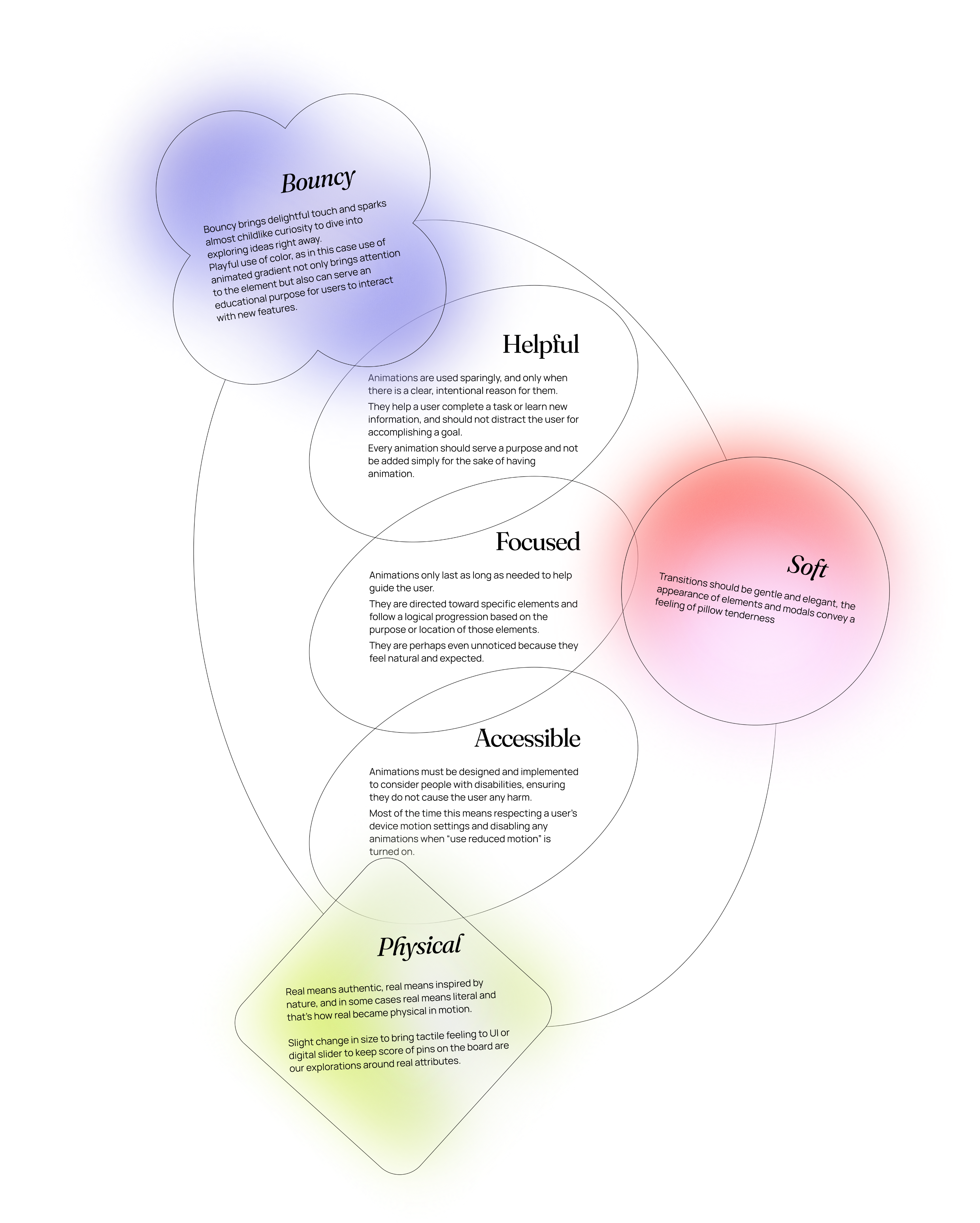
I separated the motion principles into two layers: Experience and Visual.
Experience principles defined how motion helps people understand what is happening in the interface, follow a transition, and notice feedback. Visual principles defined how that movement expresses Pinterest’s personality.
The visual refresh made this distinction useful. Pinterest’s visual language could evolve while the guidance for how interactions work stayed consistent.
I wrote both sets of principles and reviewed them with the team.
Easing System
I defined a set of easing curves for different interaction types: expressive motion for elements opening within the current view, enter and exit curves for appearing and disappearing elements, and lateral motion for navigation between surfaces. Each curve came with duration ranges, usage guidance, and product examples.
The underlying model was real-world physics: mass, distance, proximity. If motion obeys rules people already know from the physical world, the interface feels natural instead of animated.
I used an element’s visual weight and movement distance to guide the timing. Small controls used short, bouncy responses. Toasts carried more visual weight and needed longer to register, while large surfaces used more restrained motion.
I documented recommended easing and duration pairings for common patterns so teams had a starting point when designing a new interaction.
Tokens
To test the easing and duration pairings, I defined what each prototype needed to demonstrate. Another motion designer and I split the prototype work, then worked with engineers to translate the validated pairings into implementation-ready tokens.
Motion Guidelines in Gestalt Library
Guidance and playbook
I wrote the motion guidelines and playbook, explaining which behavior to use in different contexts and why. The guidance was intended for designers and engineers who had little experience with motion.
I also introduced a shared motion spec format, paired with interactive ProtoPie prototypes, and mentored teammates on writing specs. We used that format to document component behavior for design and implementation.
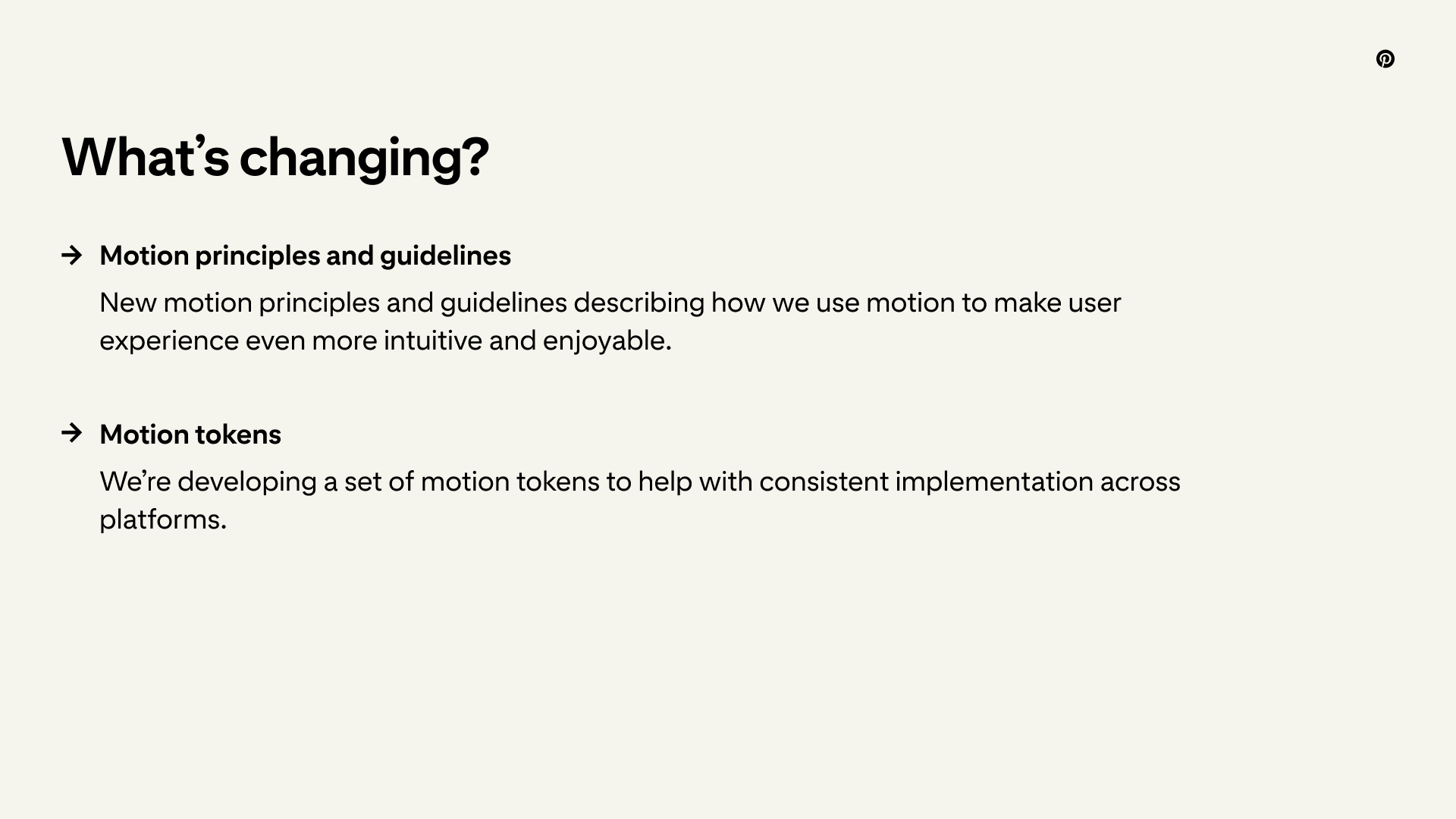
The motion guidelines were published in Gestalt, easing tokens went live, and around 15 components had documented motion specs. Teams began using the tokens and spec format on new features.
[Left: before – components have no motion.
Right: system applied.
Duration, easing, and weight aren't guessed –
they're defined.]
Impact
"Adding bespoke motion to our UI components will add another layer of polish. Thank you for your attention to detail and willingness to iterate throughout this process." – Camden Asay, Gestalt Design System Manager
The foundation also connected decisions across components. Toast and toolbar shared the same approach to visual weight and easing, giving teams a reference they could apply beyond a single interaction.
+
→
Before, toast had its own timing logic – or no real logic at all. It appeared from the top, but to dismiss it you'd swipe left. After establishing the system, toast became a reference point. Toolbar inherited the same weight and easing, not by coincidence but because both now pull from the same foundation. That's what a system does: one decision works across surfaces.
[Animations for the Automagical Boards, built following the motion system]
I applied the foundation to motion work for Automagical Boards, using the shared principles and easing system to guide new interactions.
Kirill Margolin, who managed the Automagical Boards team, put it this way:
"Whenever our team had any motion-related requests, Lesia was my go-to designer. She's someone I could fully rely on to deliver work that was well-crafted, fast, and ready to hand off to development."
It also became the starting point for the Celebration System, where I defined motion behavior and usage rules for three levels of feedback.
What I'd do differently
I would bring motion into components earlier. Guidelines still depend on someone finding and applying them. Building the behavior into a component gives teams a consistent starting point whenever they use it. I would also document transitions earlier in the process.
I would spend less time defining custom easing curves and more time exploring platform-native springs. The foundation would still need clear guidance on choosing the right behavior for each context.
other projects
Building Pinterest’s motion foundation
( ROLE )
Product Designer
( TEAM )
Gestalt Design Team, Pinterest
( TIMELINE )
2024
( TOOLS )
Figma, Protopie, After Effects
Pinterest was preparing for a visual refresh, and I used that opportunity to make the case for expanding the work beyond individual fixes.
I built Pinterest's motion system from scratch: principles, easing tokens, component specs, adoption playbook. It gave teams a shared language for how the product moves.
I was initially asked to find and fix motion bugs across Pinterest. As I investigated, I realised the recurring issues needed a shared foundation.
Problem
Challenge
I reviewed motion across iOS, Android, and Web, comparing how similar components and transitions behaved. The audit revealed problems at two levels. Some interactions were confusing on their own: a toast entered from the top of the screen but could only be dismissed by swiping left. Across the product, similar interactions behaved differently on iOS, Android, and Web, while interactions with different purposes reused the same timing and easing.
There was no shared guidance for deciding which behavior was appropriate. I could fix the examples I found, but teams would still have to make those decisions independently for the next component or feature.
I needed to define shared motion rules that teams could apply across iOS, Android, and Web. Those rules had to make interactions predictable while supporting the visual refresh.
The foundation also had to fit how designers and engineers worked. Teams needed to know which behavior to choose, how to specify it, and how to implement it in new components and features.
[before system implementation]
The key decision
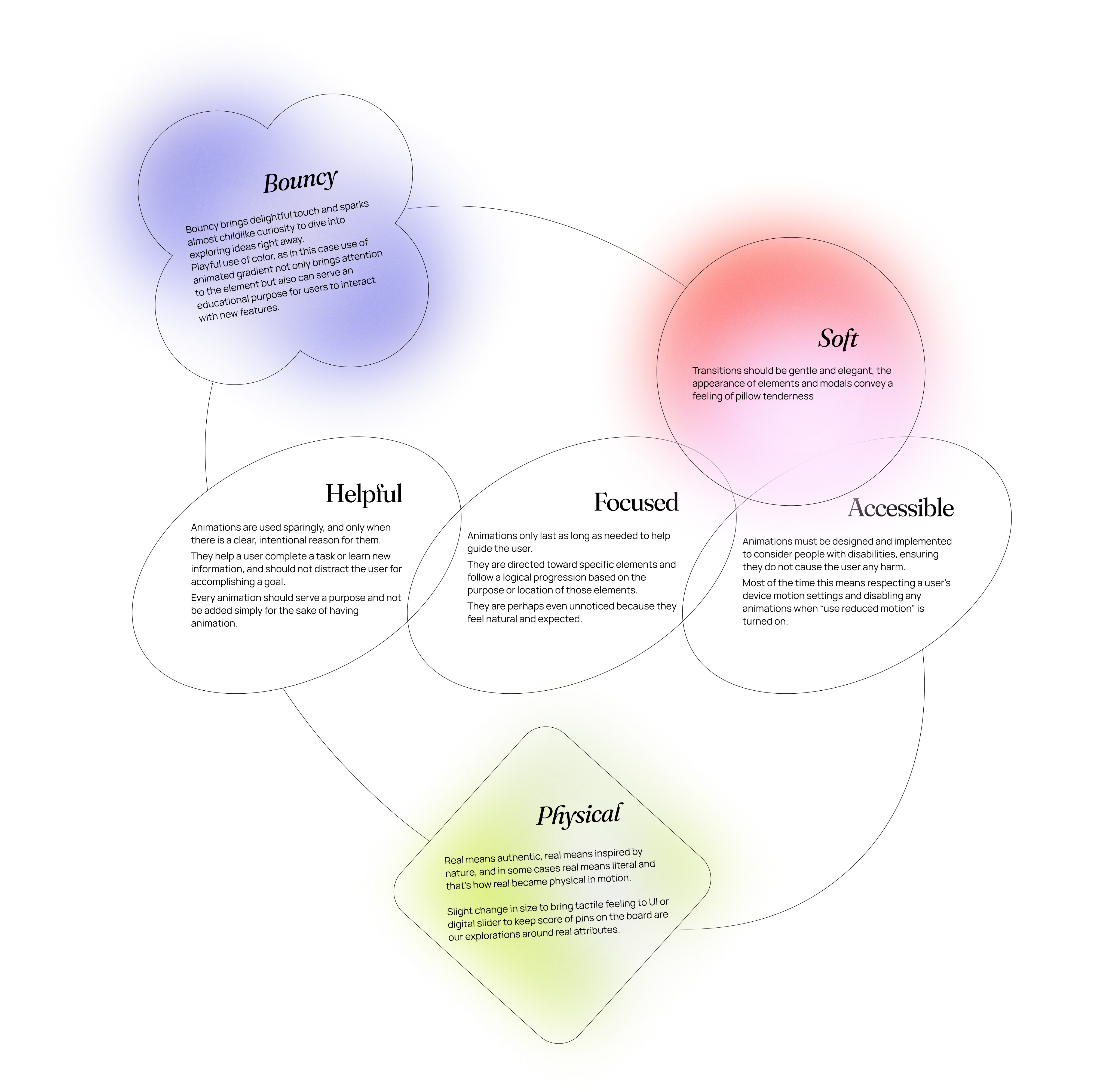
I separated the motion principles into two layers: Experience and Visual.
Experience principles defined how motion helps people understand what is happening in the interface, follow a transition, and notice feedback. Visual principles defined how that movement expresses Pinterest’s personality.
The visual refresh made this distinction useful. Pinterest’s visual language could evolve while the guidance for how interactions work stayed consistent.
I wrote both sets of principles and reviewed them with the team.
Easing System
I defined a set of easing curves for different interaction types: expressive motion for elements opening within the current view, enter and exit curves for appearing and disappearing elements, and lateral motion for navigation between surfaces. Each curve came with duration ranges, usage guidance, and product examples.
The underlying model was real-world physics: mass, distance, proximity. If motion obeys rules people already know from the physical world, the interface feels natural instead of animated.
I used an element’s visual weight and movement distance to guide the timing. Small controls used short, bouncy responses. Toasts carried more visual weight and needed longer to register, while large surfaces used more restrained motion.
I documented recommended easing and duration pairings for common patterns so teams had a starting point when designing a new interaction.
Tokens
To test the easing and duration pairings, I defined what each prototype needed to demonstrate. Another motion designer and I split the prototype work, then worked with engineers to translate the validated pairings into implementation-ready tokens.
[Motion Guidelines in Gestalt Library]
Guidance and playbook
I wrote the motion guidelines and playbook, explaining which behavior to use in different contexts and why. The guidance was intended for designers and engineers who had little experience with motion.
I also introduced a shared motion spec format, paired with interactive ProtoPie prototypes, and mentored teammates on writing specs. We used that format to document component behavior for design and implementation.
The motion guidelines were published in Gestalt, easing tokens went live, and around 15 components had documented motion specs. Teams began using the tokens and spec format on new features.
Impact
[Left: before – components have no motion. Right: system applied.
Duration, easing, and weight aren't guessed – they're defined.]
"Adding bespoke motion to our UI components will add another layer of polish. Thank you for your attention to detail and willingness to iterate throughout this process." – Camden Asay, Gestalt Design System Manager
The foundation also connected decisions across components. Toast and toolbar shared the same approach to visual weight and easing, giving teams a reference they could apply beyond a single interaction.
→
+
Before, toast had its own timing logic – or no real logic at all. It appeared from the top, but to dismiss it you'd swipe left. After establishing the system, toast became a reference point. Toolbar inherited the same weight and easing, not by coincidence but because both now pull from the same foundation. That's what a system does: one decision works across surfaces.
[Animations for the Automagical Boards, built following the motion system]
I applied the foundation to motion work for Automagical Boards, using the shared principles and easing system to guide new interactions.
Kirill Margolin, who managed the Automagical Boards team, put it this way:
"Whenever our team had any motion-related requests, Lesia was my go-to designer. She's someone I could fully rely on to deliver work that was well-crafted, fast, and ready to hand off to development."
It also became the starting point for the Celebration System, where I defined motion behavior and usage rules for three levels of feedback.
What I'd do differently
I would bring motion into components earlier. Guidelines still depend on someone finding and applying them. Building the behavior into a component gives teams a consistent starting point whenever they use it. I would also document transitions earlier in the process.
I would spend less time defining custom easing curves and more time exploring platform-native springs. The foundation would still need clear guidance on choosing the right behavior for each context.
other projects
Building Pinterest’s motion foundation
( ROLE )
Product Designer
( TEAM )
Gestalt Design Team, Pinterest
( TIMELINE )
2024
( TOOLS )
Figma, Protopie, After Effects
Pinterest was preparing for a visual refresh, and I used that opportunity to make the case for expanding the work beyond individual fixes.
I built Pinterest's motion system from scratch: principles, easing tokens, component specs, adoption playbook. It gave teams a shared language for how the product moves.
I was initially asked to find and fix motion bugs across Pinterest. As I investigated, I realised the recurring issues needed a shared foundation.
I reviewed motion across iOS, Android, and Web, comparing how similar components and transitions behaved. The audit revealed problems at two levels. Some interactions were confusing on their own: a toast entered from the top of the screen but could only be dismissed by swiping left. Across the product, similar interactions behaved differently on iOS, Android, and Web, while interactions with different purposes reused the same timing and easing.
There was no shared guidance for deciding which behavior was appropriate. I could fix the examples I found, but teams would still have to make those decisions independently for the next component or feature.
I needed to define shared motion rules that teams could apply across iOS, Android, and Web. Those rules had to make interactions predictable while supporting the visual refresh.
The foundation also had to fit how designers and engineers worked. Teams needed to know which behavior to choose, how to specify it, and how to implement it in new components and features.
Problem
Challenge
[before system implementation]
The key decision
I separated the motion principles into two layers: Experience and Visual.
Experience principles defined how motion helps people understand what is happening in the interface, follow a transition, and notice feedback. Visual principles defined how that movement expresses Pinterest’s personality.
The visual refresh made this distinction useful. Pinterest’s visual language could evolve while the guidance for how interactions work stayed consistent.
I wrote both sets of principles and reviewed them with the team.
Easing System
I defined a set of easing curves for different interaction types: expressive motion for elements opening within the current view, enter and exit curves for appearing and disappearing elements, and lateral motion for navigation between surfaces. Each curve came with duration ranges, usage guidance, and product examples.
The underlying model was real-world physics: mass, distance, proximity. If motion obeys rules people already know from the physical world, the interface feels natural instead of animated.
I used an element’s visual weight and movement distance to guide the timing. Small controls used short, bouncy responses. Toasts carried more visual weight and needed longer to register, while large surfaces used more restrained motion.
I documented recommended easing and duration pairings for common patterns so teams had a starting point when designing a new interaction.
Tokens
To test the easing and duration pairings, I defined what each prototype needed to demonstrate. Another motion designer and I split the prototype work, then worked with engineers to translate the validated pairings into implementation-ready tokens.
[Motion Guidelines in Gestalt Library]
Guidance and playbook
I wrote the motion guidelines and playbook, explaining which behavior to use in different contexts and why. The guidance was intended for designers and engineers who had little experience with motion.
I also introduced a shared motion spec format, paired with interactive ProtoPie prototypes, and mentored teammates on writing specs. We used that format to document component behavior for design and implementation.
Impact
The motion guidelines were published in Gestalt, easing tokens went live, and around 15 components had documented motion specs. Teams began using the tokens and spec format on new features.
[Left: before – components have no motion. Right: system applied.
Duration, easing, and weight aren't guessed – they're defined.]
"Adding bespoke motion to our UI components will add another layer of polish. Thank you for your attention to detail and willingness to iterate throughout this process." – Camden Asay, Gestalt Design System Manager
The foundation also connected decisions across components. Toast and toolbar shared the same approach to visual weight and easing, giving teams a reference they could apply beyond a single interaction.
+
→
Before, toast had its own timing logic – or no real logic at all. It appeared from the top, but to dismiss it you'd swipe left. After establishing the system, toast became a reference point. Toolbar inherited the same weight and easing, not by coincidence but because both now pull from the same foundation. That's what a system does: one decision works across surfaces.
[Animations for the Automagical Boards, built following the motion system]
I applied the foundation to motion work for Automagical Boards, using the shared principles and easing system to guide new interactions.
Kirill Margolin, who managed the Automagical Boards team, put it this way:
"Whenever our team had any motion-related requests, Lesia was my go-to designer. She's someone I could fully rely on to deliver work that was well-crafted, fast, and ready to hand off to development."
It also became the starting point for the Celebration System, where I defined motion behavior and usage rules for three levels of feedback.
What I'd do differently
I would bring motion into components earlier. Guidelines still depend on someone finding and applying them. Building the behavior into a component gives teams a consistent starting point whenever they use it. I would also document transitions earlier in the process.
I would spend less time defining custom easing curves and more time exploring platform-native springs. The foundation would still need clear guidance on choosing the right behavior for each context.
other projects
Vochi Text 02 Effect
→
Celebration System
→